
ChainMonitor is a free, live explorer for seven blockchains: Ethereum, Bitcoin, Arbitrum, Base, Optimism, Polygon and Solana. You can watch blocks being made, open any block, transaction or address, compare what a payment costs on every chain right now, and check which public RPC nodes are healthy. You do not need an account or a wallet to use it.
This guide follows one real payment from start to finish: someone sent 43.55 USDC on Base. The numbers in the pictures are from the moment the screenshots were taken; on the site they are always live. The yellow numbers on each picture match the numbered list below it.
The home page
Everything starts on the home page. It shows all seven chains at once, each running at its own real speed.
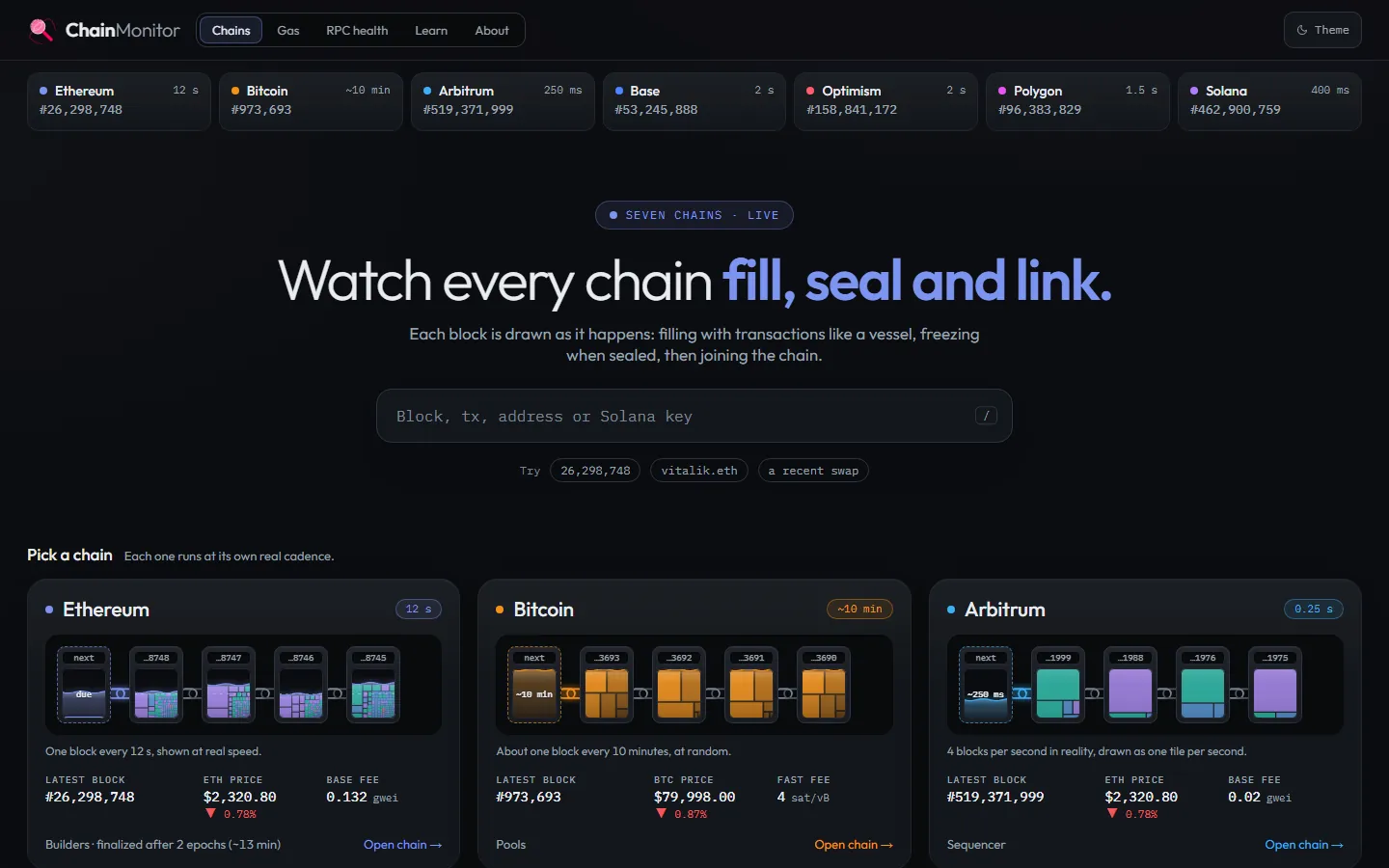
- The search box. Paste a transaction hash, an address, a block number or an ENS name such as vitalik.eth.
- The live strip. Each tile shows a chain's newest block number and its block time; it is on every page, so one click takes you to any chain.
- The main menu: Chains, Gas (fees), RPC health, Learn (these guides) and About.
- A chain card. The small tiles are the latest blocks filling up; "Open chain" leads to the chain's live page.
The search box is the fastest way in. It recognises what you paste: a hash of 66 characters starting with 0x is a transaction, 42 characters starting with 0x is an address, a plain number is a block. You can also press the / key anywhere to jump to the search.
Step 1: watch a chain live
Click Base in the live strip, or "Open chain" on its card. The chain page draws each new block as a tile the moment it is made.
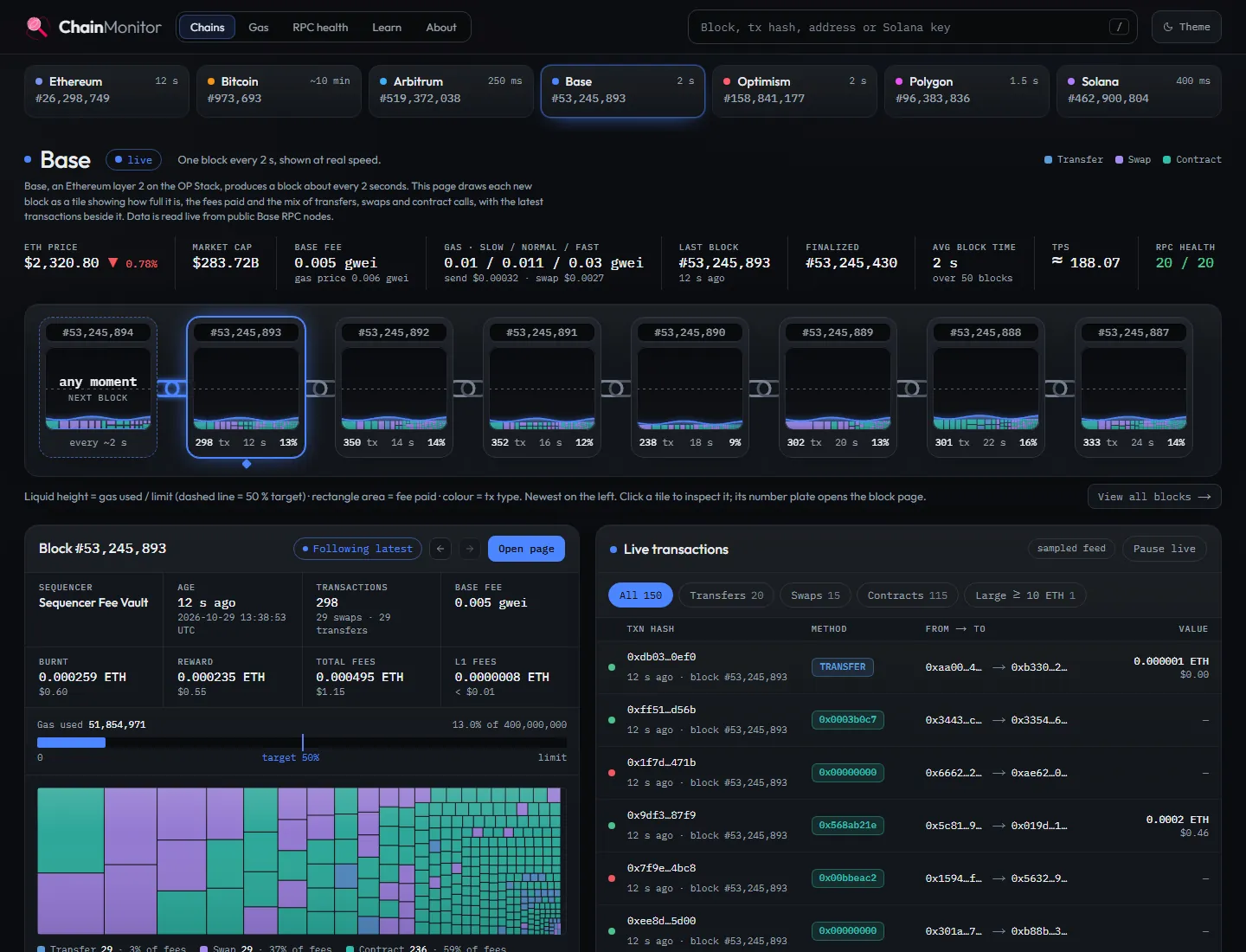
- Key numbers: coin price, base fee, the gas price for slow, normal and fast, the latest and the finalized block.
- The blocks. The liquid level shows how full a block is; the dashed line is the 50 percent target that keeps fees stable.
- The selected block in detail. "Open page" opens the full block page.
- Every rectangle is one transaction. Its area is the fee it paid, its colour the kind: transfer, swap or contract call.
- The live transaction feed, with filters for transfers, swaps, contract calls and large transfers.
You do not need to understand every number at once. A full block means demand is high and fees rise; a nearly empty one means sending is cheap right now. The guide gas and fees explained explains why.
Step 2: open the transaction
Paste the transaction hash into the search box. ChainMonitor finds the chain on its own and opens the transaction page.
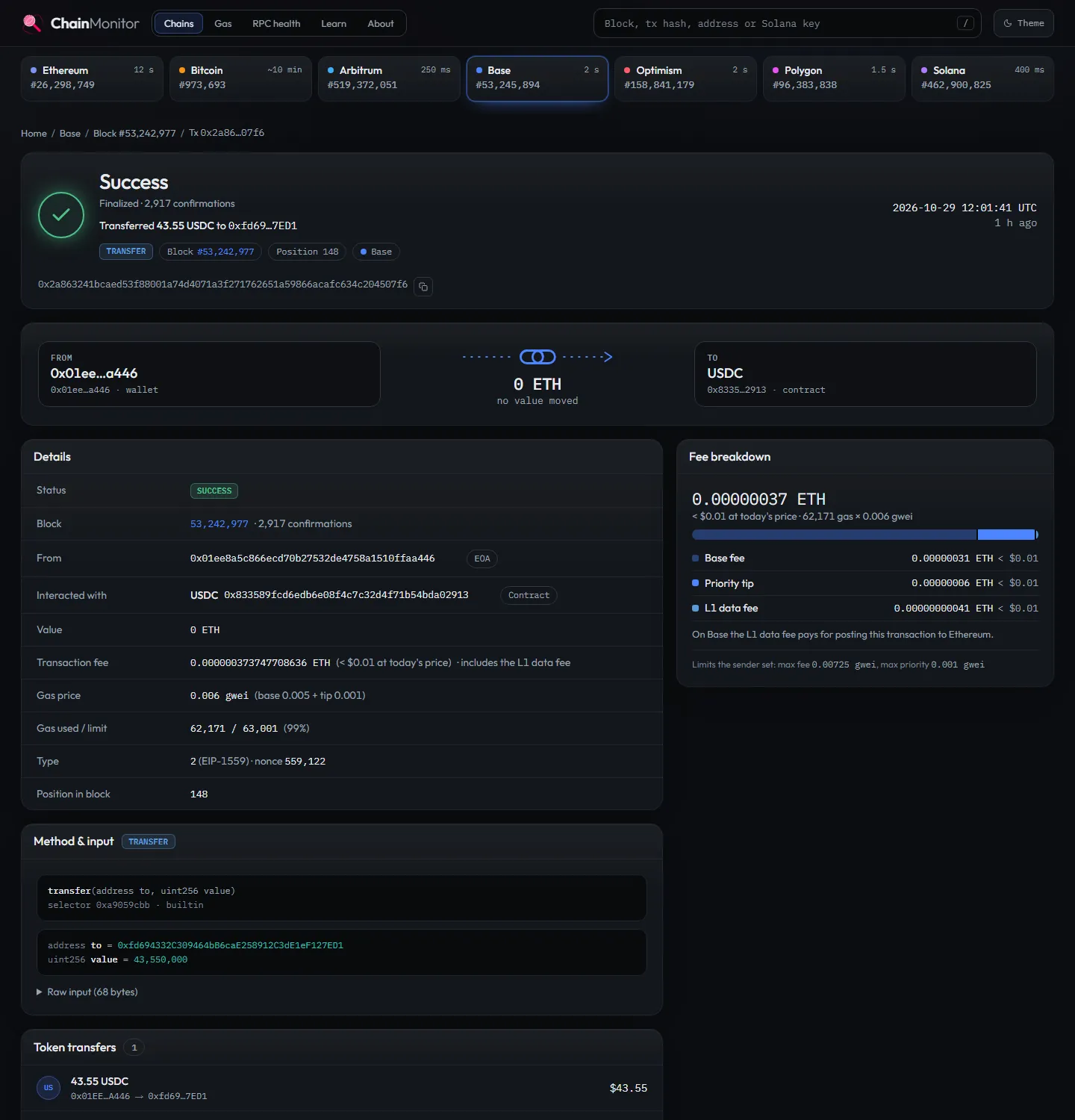
- The result in one line: Success, finalized, "Transferred 43.55 USDC to 0xfd69…7ED1".
- Who sent it and what it called. The sender is a wallet; the transaction went to the USDC token contract, so no ETH moved.
- The fee and what it is made of: the base fee, the priority tip and, on a layer 2 like Base, the L1 data fee for posting the payment to Ethereum.
- The full sender address. Click it to open the sender's page (step 3).
- The decoded call: transfer(to, value). The value 43,550,000 is in the token's smallest unit; USDC has 6 decimals, so it is 43.55 USDC.
- The token transfer itself, with its value in US dollars.
Two things often surprise people. First, the "Value" of a token payment is 0 ETH: the USDC moves inside the token contract, not as ETH. Second, the whole fee was far less than a cent, because Base is a layer 2. The guide how to read a transaction explains every field on this page.
Step 3: look at the sender
Click the sender's address. The address page shows its balance, how active it is and its history.
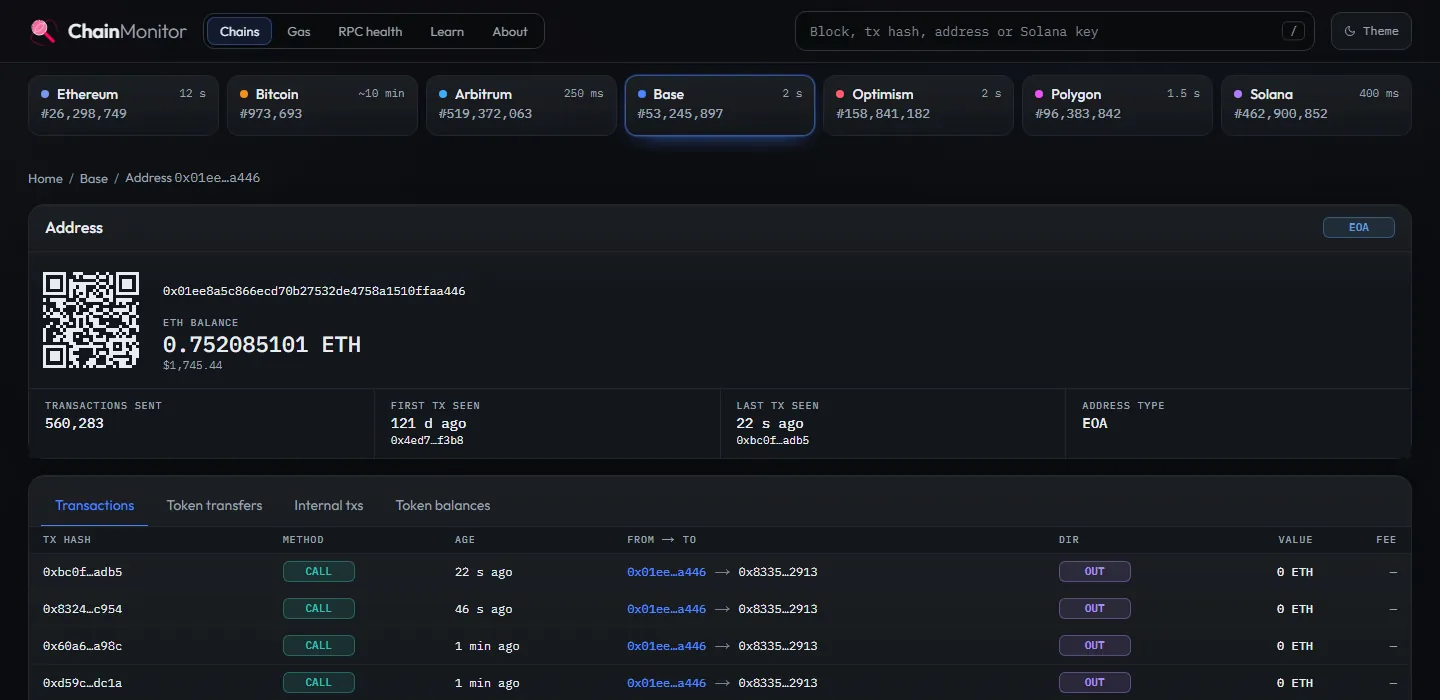
- The address with a QR code and its ETH balance on this chain.
- Activity at a glance: transactions sent, first and last transaction seen, and whether it is a wallet (EOA) or a contract.
- The tabs. "Token transfers" lists the USDC and other tokens it sent and received; "Token balances" shows what it holds.
- The history. Click any hash to open that transaction.
The same address can exist on every EVM chain (Ethereum, Arbitrum, Base, Optimism and Polygon), with a separate balance on each. Use the live strip at the top to switch chains: on an address page, a click on another chain opens the same address there. The guide wallets and keys explains why.
Step 4: what would it cost elsewhere?
Open Gas in the menu. The comparison at the top shows what the same kind of payment costs right now on every chain.
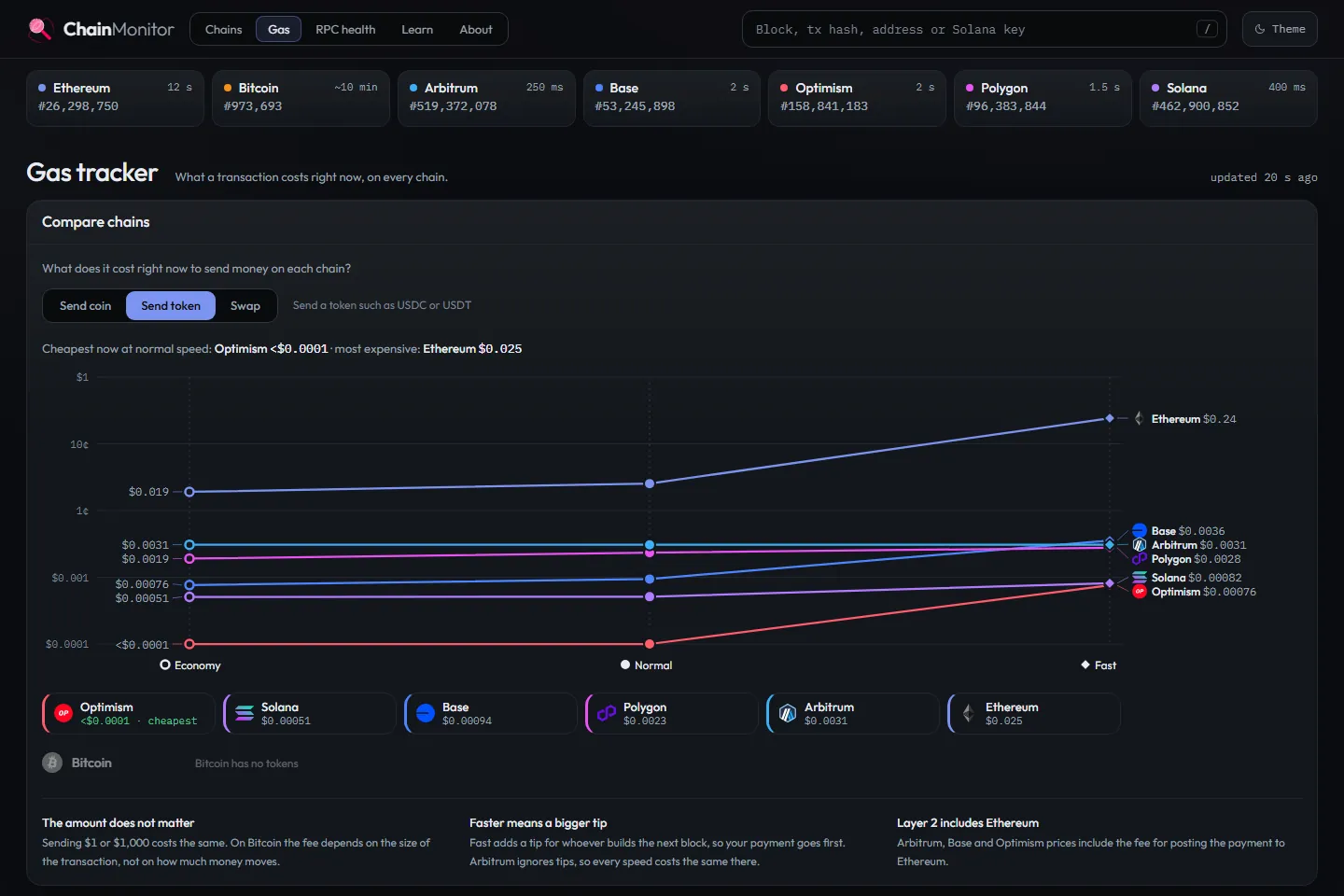
- Choose what you want to do: send the coin, send a token such as USDC, or a swap.
- One line per chain, from economy on the left to fast on the right. Lower is cheaper; the scale grows tenfold per step.
- Lines can cross: a fast payment on one chain can still be cheaper than a slow one on another.
- The chains ranked at normal speed, cheapest first. Tap one to highlight its line.
- Short notes: the amount does not change the fee, faster means a bigger tip, and layer 2 prices include the Ethereum data fee.
For our payment, sending a token on Base, Optimism, Arbitrum, Polygon or Solana costs a fraction of a cent to a few tenths of a cent, while Ethereum costs more. Bitcoin is not in the token comparison, because Bitcoin has no tokens like USDC. Below the chart, one card per chain shows the full detail. The guides why fees differ between chains and the cheapest way to send USDC go deeper.
Step 5: check the nodes
Wallets and apps talk to a chain through RPC nodes. RPC health lists the free public nodes of each chain and tests them all the time.
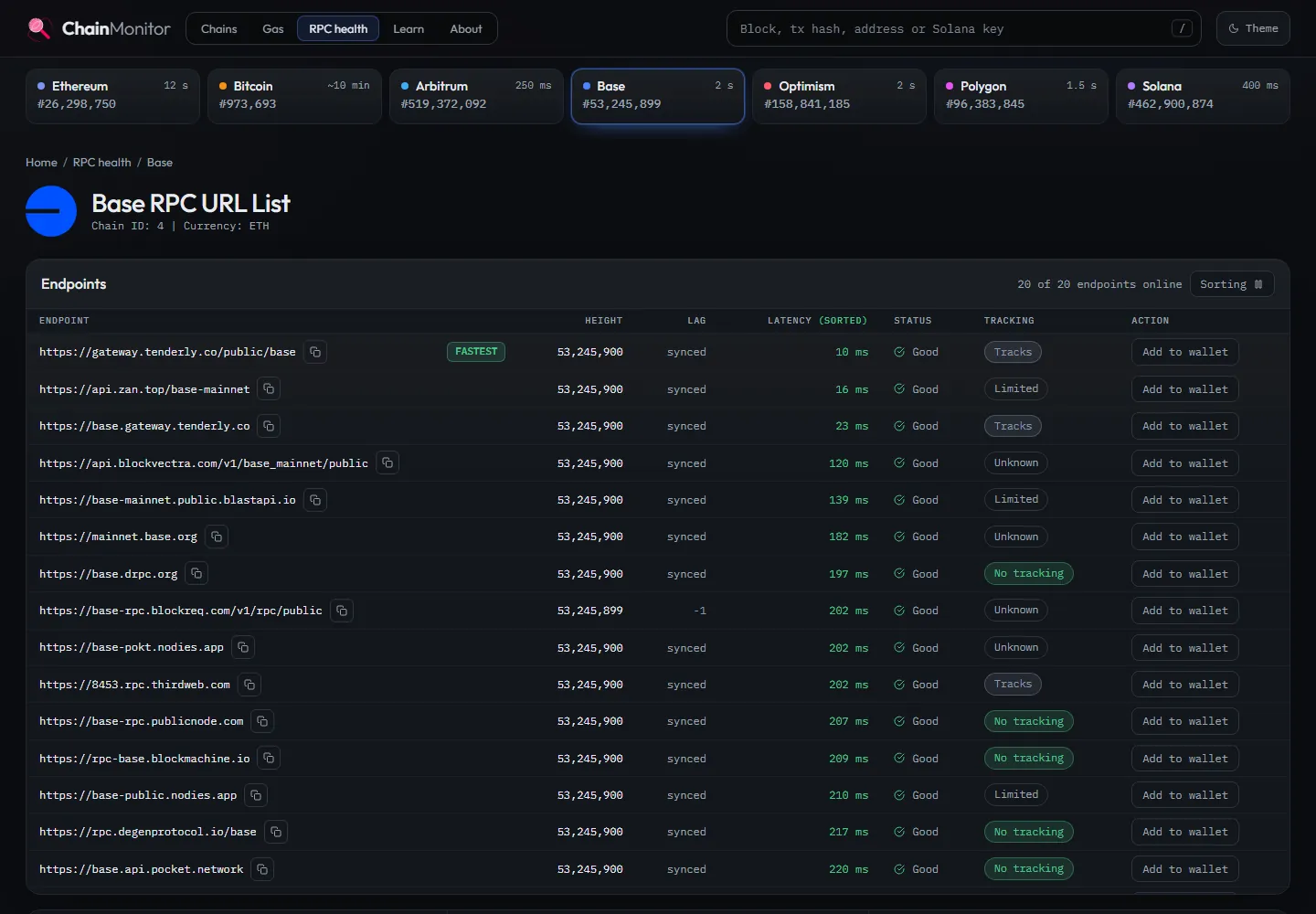
- How many endpoints answer right now.
- The fastest endpoint at this moment.
- Latency: how long an answer takes, measured from ChainMonitor's server.
- Lag: how many blocks an endpoint is behind the others. "synced" means it is up to date.
- Tracking: what the provider says it logs about your requests.
- Add to wallet: adds the endpoint to a browser wallet such as MetaMask in one click.
If your wallet feels slow or shows an old balance, its RPC node may be lagging. Pick a fast, synced endpoint here and add it. The guide what is a public RPC endpoint explains the trade-offs, including privacy.
Tips
- Switch chains from any page. The live strip at the top keeps the kind of page where it can: from an address on Base, a click on Arbitrum opens the same address on Arbitrum.
- Light or dark. The Theme button in the top right corner switches between them.
- Everything is live. Pages update on their own; you can pause the live transaction feed on a chain page to read it calmly.
- Learn as you go. Every chain page links to its guide, and the learning path takes you from the basics to the details in order.
Frequently asked questions
Is ChainMonitor free, and do I need an account?
Yes, it is free, and there is no account or sign-up. You never connect a wallet to look something up; the only wallet action is the optional "Add to wallet" for an RPC endpoint.
Can ChainMonitor move or recover my funds?
No. ChainMonitor only reads public blockchain data. It cannot send, stop, reverse or recover a transaction, and nobody from ChainMonitor will ever ask for your seed phrase or private key.
Why can I not find my transaction?
Check that it is on one of the seven supported chains and that you pasted the whole hash. A transaction that is still pending may not be visible yet; on Bitcoin it waits in the mempool until a miner includes it. If a wallet shows "sent" but no hash, the wallet may not have broadcast it.
Why does a token payment show a value of 0?
The value field shows the chain's own coin, such as ETH. A token like USDC moves inside the token's contract, so the coin value is 0 and the token amount appears under token transfers.
Which chains does ChainMonitor support?
Ethereum, Bitcoin, Arbitrum, Base, Optimism, Polygon and Solana. Bitcoin has its own pages for blocks, transactions and the mempool, and has no RPC health page because it is read through REST APIs.